I've had a some people ask if it's possible to add envelope curves in Ableton Live. It is! And here is how to do it.

Showing posts with label How to. Show all posts
Showing posts with label How to. Show all posts
Friday, January 14, 2011


Friday, January 7, 2011
Creating your own snare drum with Ableton part 1
Using sample packs is fine for some, but have you ever made your very own snare or drum sounds from scratch using Ableton or any DAW for that matter? If you haven't or even if you have this tutorial, which is a 2 parter btw, will show some good methods on how to do this.
Here is part 1 where Nick shows us how it's done. For part 2 visit the link below this video.
Here is part 1 where Nick shows us how it's done. For part 2 visit the link below this video.
Sunday, January 2, 2011
Creating clip variations in Ableton live's clip editor
Today we look at short tutorial by Zettt1981. He shows us some good ways of creating clip variations in Ableton Live by adjusting start and end points, manipulating the transpose as well as adding effects like reverb.
Friday, December 17, 2010
How to use the new shuffle and swing parameters in Ableton Live 8
Ableton Live 8 has a new and better way to add groove or swing to your tracks, and it allows you to extract grooves from other tracks or loops and store them for use in Live's new Groove pool.
This great tutorial video made by Nick, shows how to use this new feature as well as what new options you have for controlling the groove in different ways.
This great tutorial video made by Nick, shows how to use this new feature as well as what new options you have for controlling the groove in different ways.
Thursday, December 9, 2010
How to make custom skins for Ableton Live
Here is a link to the custom skin I made if you would like to use it.
http://www.zshare.net/download/83663573747c55bc/
And here is a link to the Custom Skin editor app, if you would like to make your own skins:
http://sonictransfer.com/ableton-live-skin-editor.shtml
Adding the skin is easy:
Right click on Live, click contents/App-Resources/Skin
Then drop the .ask file in there. Then launch Live go to preferences and choose the new skin, Easy on the eyes.
Friday, November 5, 2010
Advanced technique for creating a deep kick drum in Ableton Live
Power cord for your kick. A simple method to play a perfect 5th or power chord in a kick drum demonstrated with Operator in Ableton Live 7.
Friday, September 24, 2010
How to deep clean your vinyl record collection.
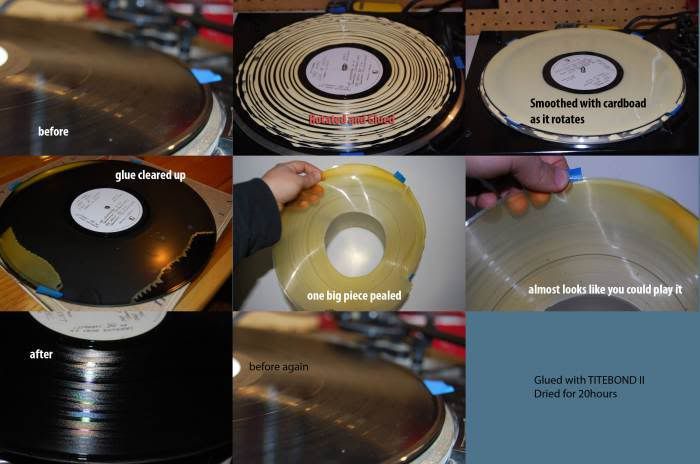
I stumbled onto this tip a while back and quickly realized how awesome this is, so I thought I would share it with you guys. Using simple PVA craft glue aka wood glue to create a mud-mask of sorts to harden and pull out all the dirt, grime and dust a record collects over its lifetime. (It's important that you use wood glue as it will not bond to the vinyl).
Instructions:
1) Place you vinyl on a turntable, preferably a cheap one. No one wants to risk a nice Vestax or Technics turntable or lay underneath your record a big sheet of wax paper to protect against spillage.
2) Start the turntable and begin to apply a steady, even stream of wood glue. Make sure you use enough glue to create a nice thick layer, if you make it too thin, you're gonna be spending hours picking off little crumbs of glue.
3) Smooth out the lines of glue as the record spins and allow the glue to dry completely, roughly 20 hours.
4) Use an Post-it or similar adhesive tab to peel the dried glue from the record. Celebrate and brag to your DJ friends about your accomplishment.
Friday, August 6, 2010
How to add Rhythmic Gating in Ableton Live
This month Brian Trifon of Trifonic demonstrates how to use dummy clips in Ableton Live to create automated gated patterns and add interesting, complex rhythms to your pads or lead sounds.
If you would like to see more of what Brian Trifon does and his music check out the links below:
http://www.trifonic.com
http://nextstepaudio.com
If you would like to see more of what Brian Trifon does and his music check out the links below:
http://www.trifonic.com
http://nextstepaudio.com
Tuesday, June 29, 2010
MPC Style, Pad Cycling with Ableton Live
If you're a fan of the MPC, undoubtedly THE game changer for hip hop producers as well as many other genre's of electronic music. Well check this out, Ableton takes MPC possibilities to a whole other level. The problem that hardware based pieces of gear like the Akai MPC have always had is their limited amount of sounds they come with, as well as little or no capability to "create" new sounds. But if you get one of the MPC-like midi controllers, Midi Yoke, and Ableton on a laptop or desktop, the sky's the limit.
In the video below by Stray411, you will see some of the potential this combo has. Enjoy and remember to eat your beetz!
In the video below by Stray411, you will see some of the potential this combo has. Enjoy and remember to eat your beetz!
Sunday, October 11, 2009
Fermixx shows us how to make a minimal track using Ableton Live.
Yep it's subtitled but this video even with subtitles shows better than most, how to make a sweet sounding minimal track.
Sunday, September 13, 2009
Subscribe to:
Posts (Atom)